Chrome extension for YouTube

Block the YouTube channels, words and topics you don't want

Shun hides them from Home, search and Up next, right inside YouTube. Shorts too, with one switch.

Formerly CleanFeed for YouTube.

  • Free features stay free: from v1.4.2 on, nothing free will move to Pro. v1.4.2 made one change: adding your own words to a topic is now Pro for new installs. Every earlier install keeps it free.
  • No ads, no tracking, no affiliate code.
  • If Shun ever changes owner, it will be announced here first.

Checked on the real youtube.com: last verified November 23, 2026

  • Unlimited channel blocking on the free plan
  • No account
  • No tracking
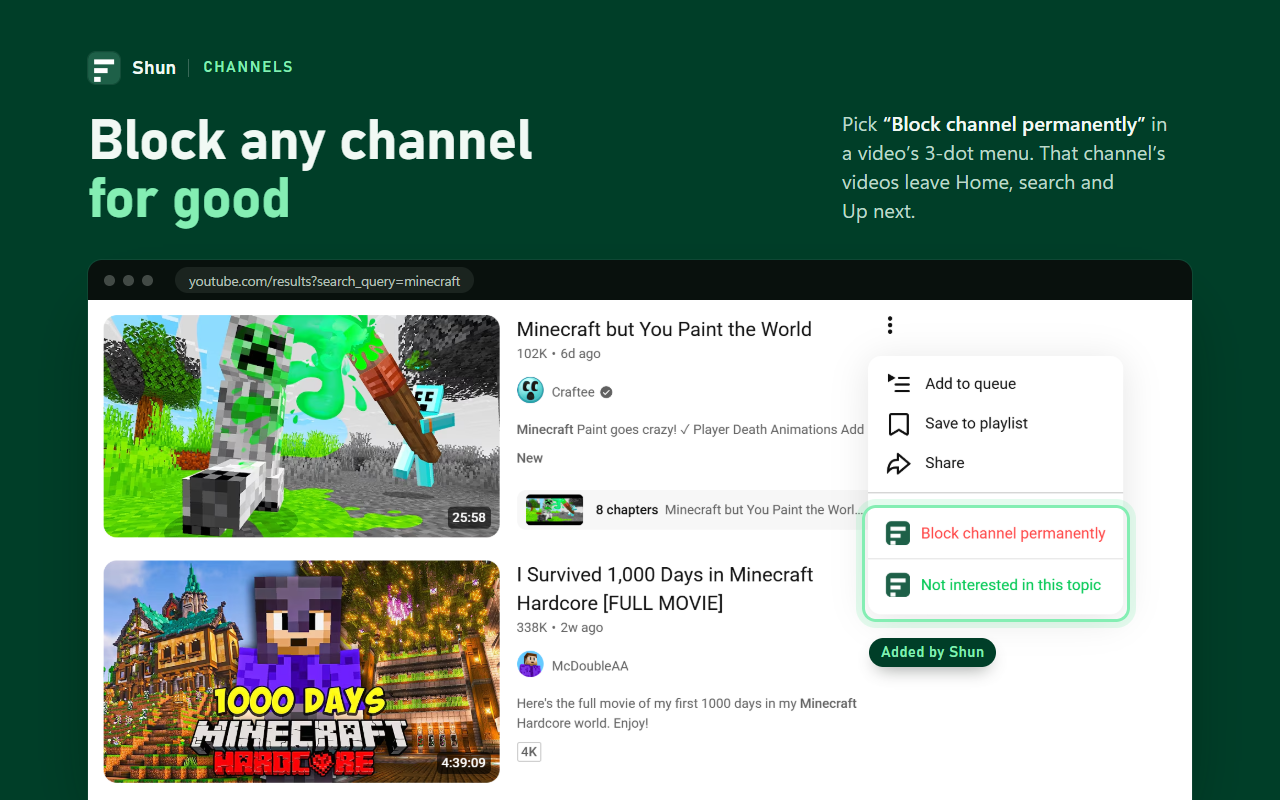
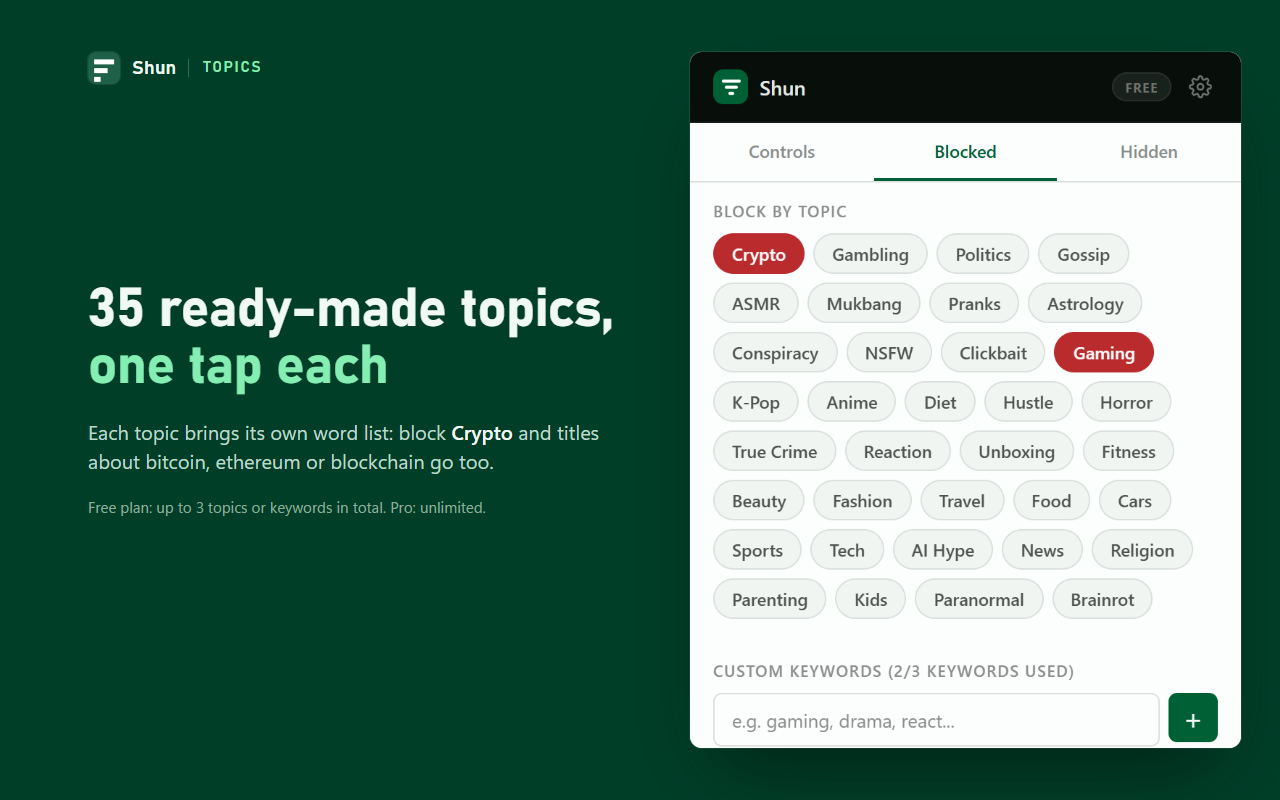
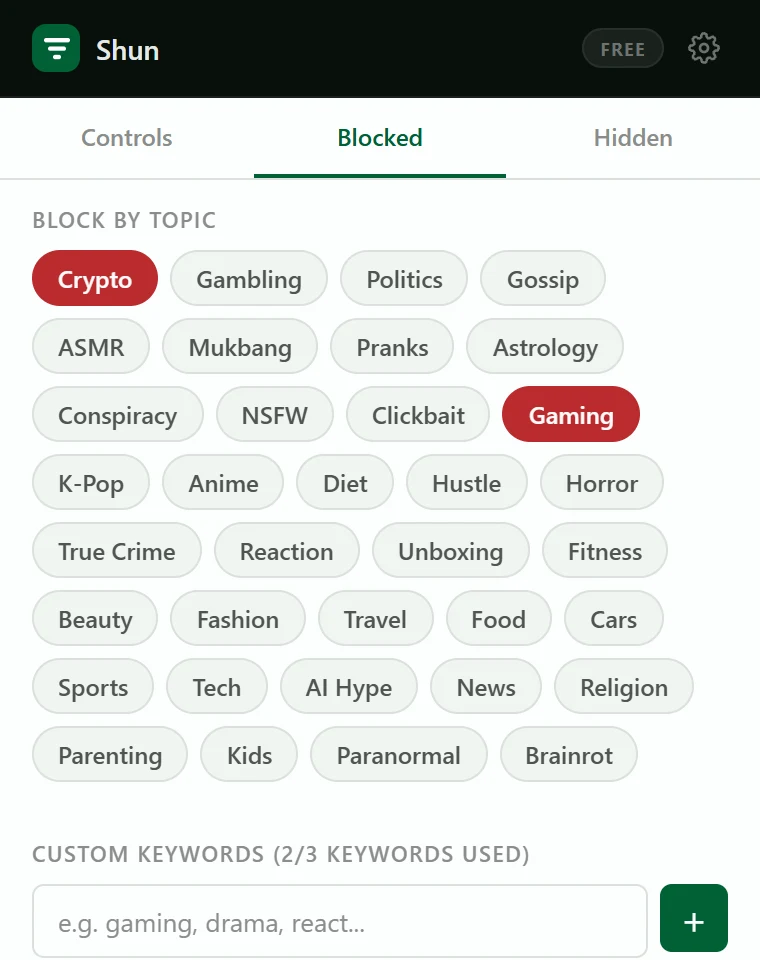
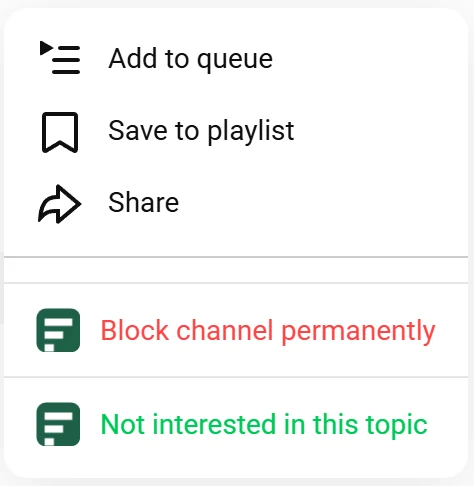
The Shun popup on its Blocked tab: a grid of 35 topics from Crypto to Brainrot, with Crypto and Gaming switched on, and a field for custom keywords. A YouTube video's 3-dot menu with two items added by Shun: Block channel permanently, and Not interested in this topic.

Clicked “Don't recommend channel” and it came back?

YouTube's “Don't recommend channel” and “Not interested” are feedback for its recommendations. They aren't a blocklist, and YouTube's help page doesn't say they keep a channel out of search.

Shun keeps a list in your browser and hides the videos that match it as the page loads, so a blocked channel's videos are hidden on Home, search and Up next.

How to block a YouTube channel, step by step

Why “Don't recommend channel” doesn't stick

How it works

Everything happens inside YouTube

Block from the menus you already use. Change anything and every open YouTube tab updates right away, no reload.

Channels

Block a channel from the 3-dot menu

Pick “Block channel permanently” in any video's 3-dot menu, or press “Block this channel” on the video or channel page. Its videos disappear at once.

  • Hidden from Home, search, Up next, channel pages and playlists
  • In the Shorts player, a blocked channel's Short is hidden and paused, so you don't hear it
  • In search results and playlists, also matched by @handle, which helps when a channel is renamed
  • Unlimited on the free plan
YouTube search results for Minecraft with a video's 3-dot menu open. Under YouTube's own items, Shun adds Block channel permanently and Not interested in this topic.

Keywords and topics

Block a word, or a whole topic at once

Type a word or phrase and videos with it in the title are hidden. Or switch on one of 35 ready-made topics, each with its own list of related terms.

  • Whole words only: “game” hides “Game night” but not “Endgame”
  • Works in any alphabet. A word matches only where it stands apart, so in Japanese or Chinese titles, which don't use spaces, a word often won't match
  • Only the title is checked, not the description
  • Topic word lists cover English and Italian titles. Switch off any term; with Pro, add your own
  • Gaming, AI Hype and News let some analysis, history and documentary titles through
  • 3 videos from one channel hidden for the same topic? Shun hides the whole channel. Untag undoes it
  • Free: 3 slots shared by keywords and topics. Pro: unlimited

The 35 ready-made topics

  • Crypto
  • Gambling
  • Politics
  • Gossip
  • ASMR
  • Mukbang
  • Pranks
  • Astrology
  • Conspiracy
  • NSFW
  • Clickbait
  • Gaming
  • K-Pop
  • Anime
  • Diet
  • Hustle
  • Horror
  • True Crime
  • Reaction
  • Unboxing
  • Fitness
  • Beauty
  • Fashion
  • Travel
  • Food
  • Cars
  • Sports
  • Tech
  • AI Hype
  • News
  • Religion
  • Parenting
  • Kids
  • Paranormal
  • Brainrot
The Shun popup's Block by Topic grid with 35 topics. Crypto and Gaming are switched on, and 2 of the 3 free keyword slots are used.
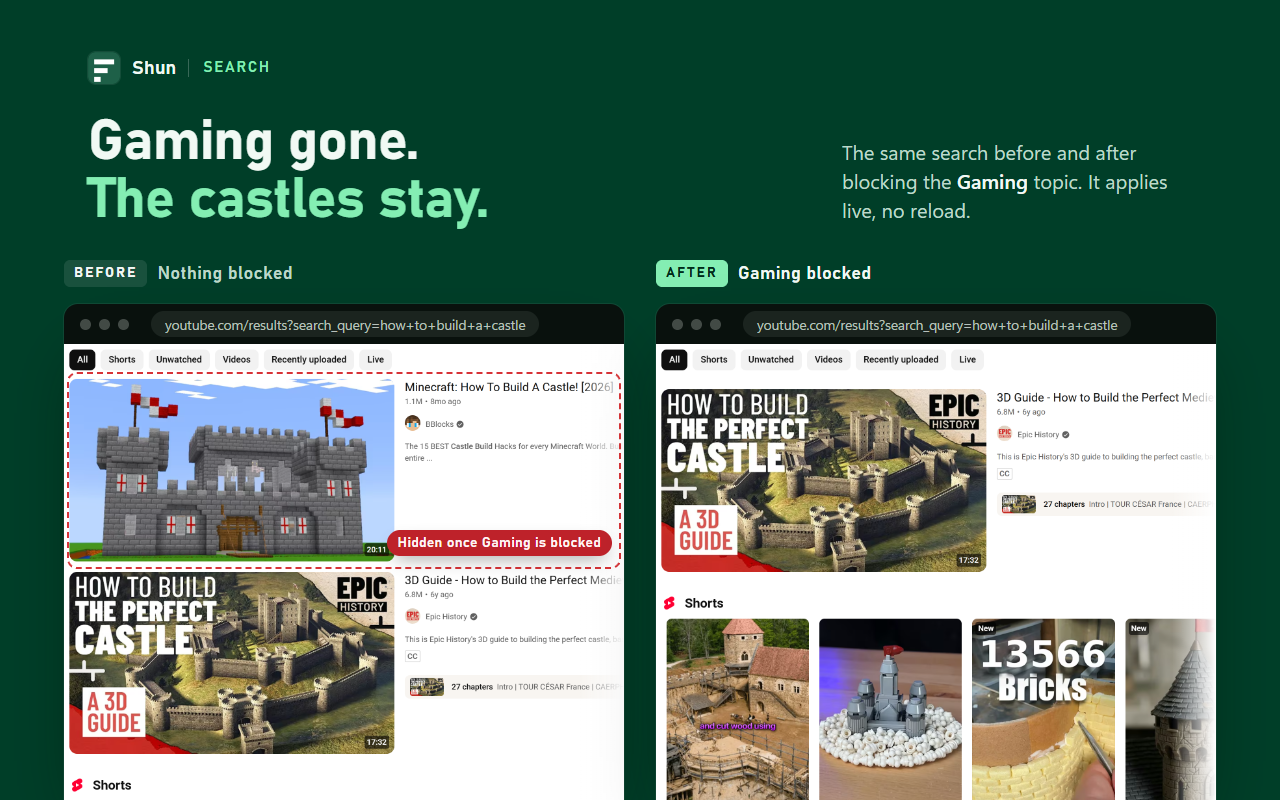
The same YouTube search for how to build a castle, before and after blocking the Gaming topic. The Minecraft castle video is gone; the real castle videos stay.
The same search before and after switching on Gaming. It applies live, without a reload.

Find what to block

Pick words straight from a video title

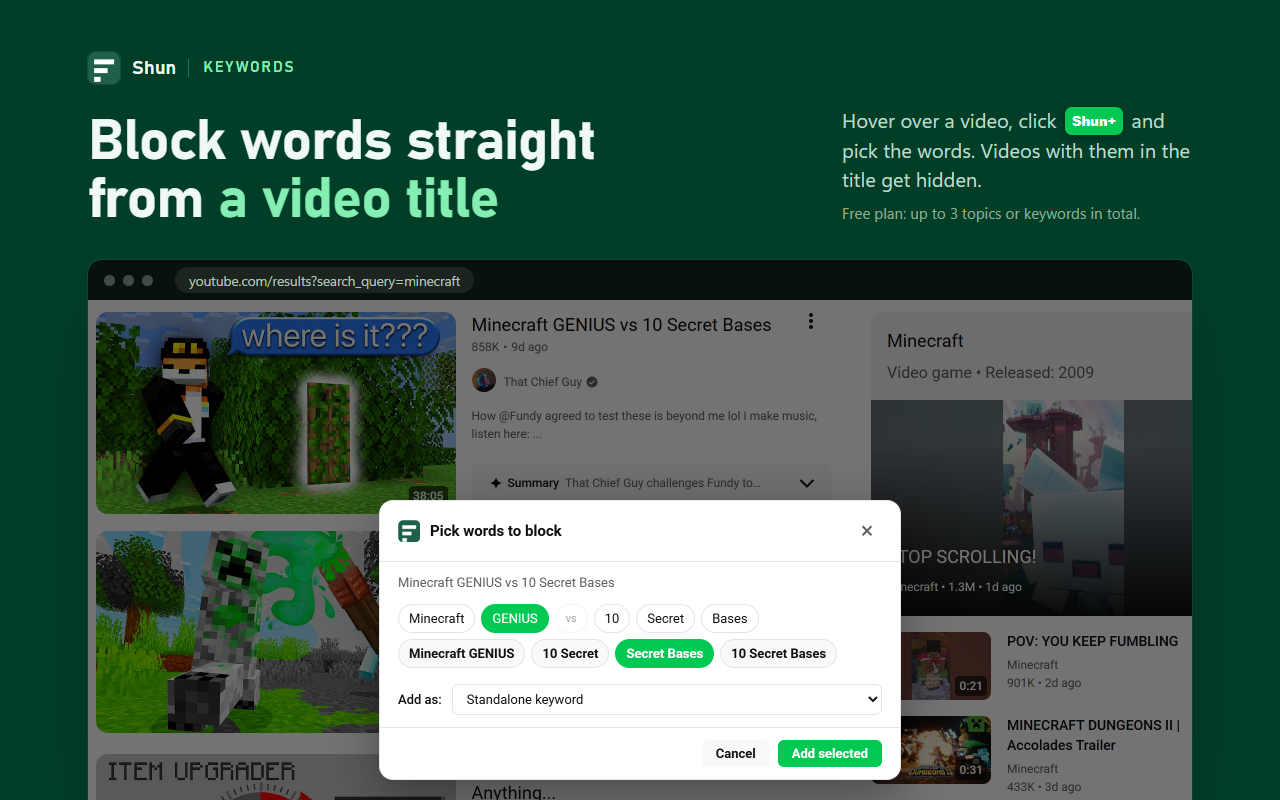
Hover a video and click the green Shun+ button. Its title turns into words and phrases you can tick and block.

  • “Not interested in this topic” in the 3-dot menu: block the video's whole topic, one word, or skip just that video
  • Scan, on a channel page, suggests up to 40 words and phrases that keep coming up in its titles
  • Words you add count toward the free plan's 3 slots
Shun's Pick words to block dialog over YouTube search results, built from the title Minecraft GENIUS vs 10 Secret Bases, with GENIUS and Secret Bases selected.

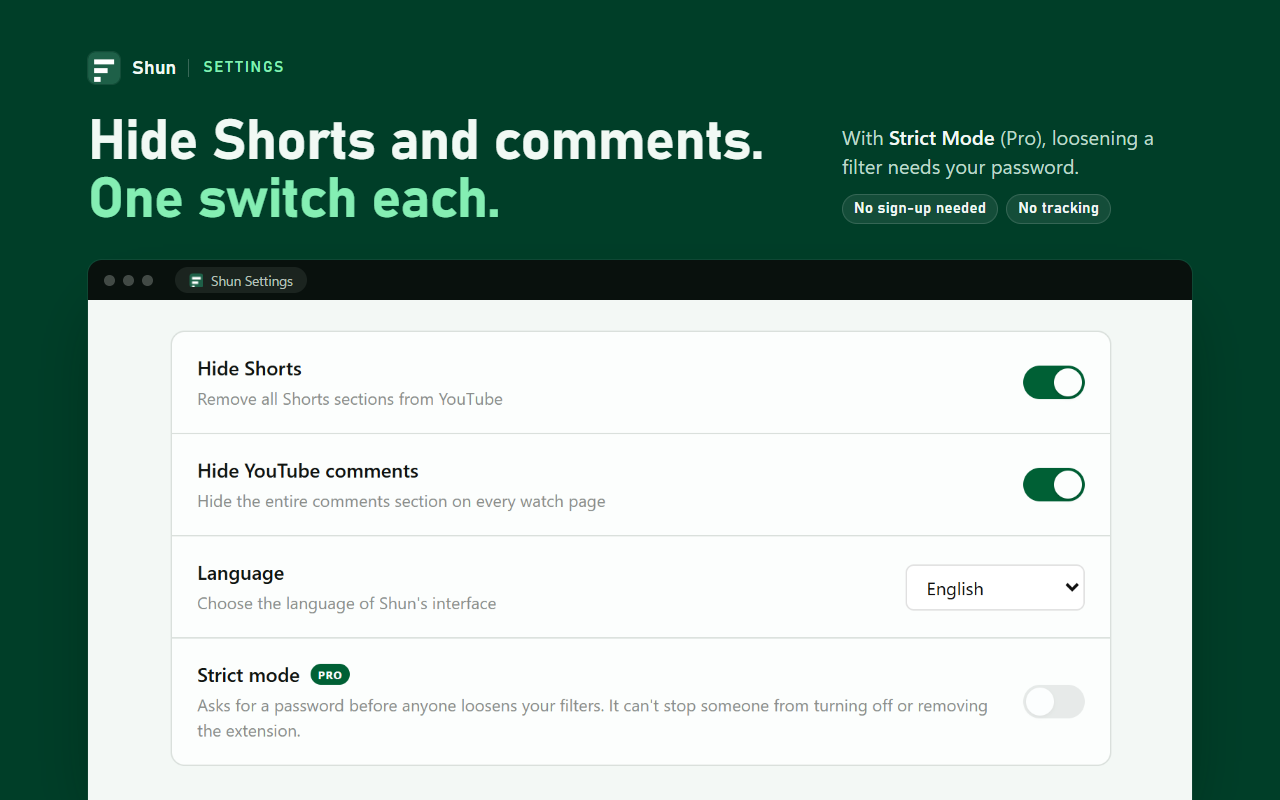
Shorts and comments

Hide Shorts and comments, one switch each

Hide Shorts removes them from Home, Subscriptions, search and the sidebar. Hide comments removes the whole comments section under videos.

  • Both stay off until you switch them on
  • In Subscriptions, Shun hides the “Most relevant” section YouTube's algorithm adds, so you see what your channels posted (on by default)
  • A Short opened from a direct link still plays

How to turn off YouTube Shorts on desktop

Shun Settings with Hide Shorts and Hide YouTube comments switched on, a language menu, and Strict mode marked Pro.

Stay in control

Look past a filter without undoing it

Show just now
See a blocked channel's videos on one page without unblocking it.
Pause on this page
A Shun switch in YouTube's top bar turns filtering off for the current page. It's back on when you move to another page.
Export and Import
Save your blocks and settings to a file, and load them on another computer.
Light and dark
The popup and Settings follow your system theme. Buttons on YouTube follow YouTube's theme.
Strict Mode Pro
A password is needed before anyone can loosen your filters. It can't stop someone from turning off or removing the extension.

By design, blocks never apply to your Subscriptions feed. You chose those channels, so Shun leaves that feed alone. Hide Shorts and the “Most relevant” switch still work there.

Free and Pro

Channel blocking is free. Pro unlocks the rest.

Free

$0

No card, no account.

  • Unlimited channel blocking
  • 3 slots shared by keywords and topics
  • Hide Shorts, comments and “Most relevant”
  • 3-dot menu items, Block this channel, Shun+ and Scan
  • Show just now and page pause
  • Export, Import and Stats

Pro

Everything in Free, plus:

  • Unlimited keywords and topics
  • Add your own words to any topic
  • Strict Mode: a password is needed to loosen your filters
  • A log of the last 100 hidden videos, with the reason
  • Exceptions for channels you subscribe to
  • Lifetime$29.99one-time, launch price until December 31, 2026
  • Yearly$19.99per year: $1.67 a month, save 44%
  • Monthly$2.99per month

30-day money-back guarantee: if a channel you blocked keeps showing up, or Shun isn't for you, email Shun support within 30 days of paying and get a full refund. No questions asked. Refund policy

Prices in USD. Upgrade from Shun's popup or Settings. Checkout and payments are handled by ExtensionPay with Stripe; the developer never sees your full card number.

Free and Pro, feature by feature
FeatureFreePro
Channel blockingUnlimitedUnlimited
Keywords and topics, combined3Unlimited
Add your own words to a topicNo (installs from before v1.4.2 keep it)Yes
Quick presets (3 topics each)When they fit in your 3 slotsAll 5
Hide Shorts, comments and “Most relevant”YesYes
Shun+, Scan and “Not interested in this topic”YesYes
Auto-tag and discussion-video exceptionsYesYes
Show just now and page pauseYesYes
Stats, Export and ImportYesYes
Log of the last 100 hidden videosNoYes
Exceptions for subscribed channelsNoYes
Strict Mode password lockNoYes

Privacy

Your lists stay in your browser

Shun is a filter, not a service. There's nothing to sign in to and nothing to report back.

Read the privacy policy

No account
Install it and start blocking. There's nothing to sign up for.
No tracking
No analytics and no tracking scripts. Shun doesn't send your blocklists, settings or viewing anywhere.
One outside service
Shun's scripts run on youtube.com. The only other site it talks to is extensionpay.com, for Pro prices and payments.

FAQ

Questions people ask first

Something else? Email Shun support (factuallogic98@gmail.com).

Is Shun really free?

Yes. The free plan has unlimited channel blocking, 3 slots shared by keywords and topics, Hide Shorts, Hide comments and every tool except Strict Mode and the Pro extras listed below. Pro is optional: it adds unlimited keywords and topics, your own words inside topics, Strict Mode, a log of the last 100 hidden videos and exceptions for channels you subscribe to.

Does it work on my phone, tablet or TV?

No. Shun is a Chrome extension, so it works on youtube.com in Chrome on a computer. It can't change the YouTube app on phones, tablets, TVs or game consoles.

Why doesn't it hide anything in my Subscriptions feed?

That's on purpose. You picked those channels, so channel, keyword and topic blocks never apply to the Subscriptions feed. Two things do work there: Hide Shorts, and hiding the “Most relevant” section that YouTube's algorithm adds to the feed.

Do I need an account?

No. There's no Shun account and no sign-up. If you buy Pro, payment runs through ExtensionPay's checkout with Stripe, which asks for an email address for the purchase.

What does Shun do with my data?

Your blocklists and settings stay in your browser. Shun has no analytics and no tracking, and it doesn't send your lists anywhere. The only outside service it talks to is ExtensionPay, for plan prices and payments. The privacy policy has the details.

Does blocking a channel tell YouTube or the creator?

No. Shun hides videos on your screen. It sends nothing to YouTube and the channel isn't notified.

That also means it doesn't train YouTube's recommendations: YouTube may keep suggesting the channel, and Shun keeps hiding it. A video you open from a direct link still plays.

How do keywords and topics match video titles?

Keywords match whole words in a video's title: blocking “game” hides “Game night” but not “Endgame”. Works in any alphabet. A word matches only where it stands apart, so in Japanese or Chinese titles, which don't use spaces, a word often won't match. Only the title is checked, not the description.

A topic is a ready-made word list: turn on Crypto and titles with words like bitcoin or blockchain go too. Topic lists cover English and Italian words, and you can switch off any term; with Pro, add your own.

Can I move my blocklist to another computer?

Yes, with Export and Import in Shun's Settings. Export saves your blocks and settings to a JSON file, and Import loads that file on the other computer.

Can I use it as a parental control?

Only loosely. Strict Mode (Pro) asks for a password before anyone can unblock channels, remove keywords or turn off Hide Shorts. It can't stop someone with access to Chrome's extension settings from turning Shun off or removing it, so it isn't a full parental-control tool.

What happens when YouTube changes its layout?

Something may slip through for a while. Shun works on YouTube's pages, and YouTube changes them often, which can break any extension like it until an update ships. If you spot a problem, use Report a Bug in Shun's Settings or email Shun support (factuallogic98@gmail.com).

When Shun was last checked on YouTube, what was checked, and what changed in each version.

Try it on your own feed

Free, no account, and it starts working in YouTube tabs you already have open. Block one channel and see what changes.

Add to Chrome, it's free